
Room Control
The screen never blinks.
That’s the whole job.
Room Control is the app our operators run your room on — switching what’s on screen, launching every deck, rolling timers and graphics, and recording it all. Built by us, used by us, on real show floors. You don’t buy it; it comes with the crew.
We sweat the screen so you don’t
What’s on the big screen never glitches.
Cameras, slides, video — whatever’s live stays smooth and clean. If something behind the curtain hiccups, the audience never sees it. That’s the whole reason to have pros (and our software) in the back of the room.
glitches the audience ever saw.
That’s the promise.
Switching
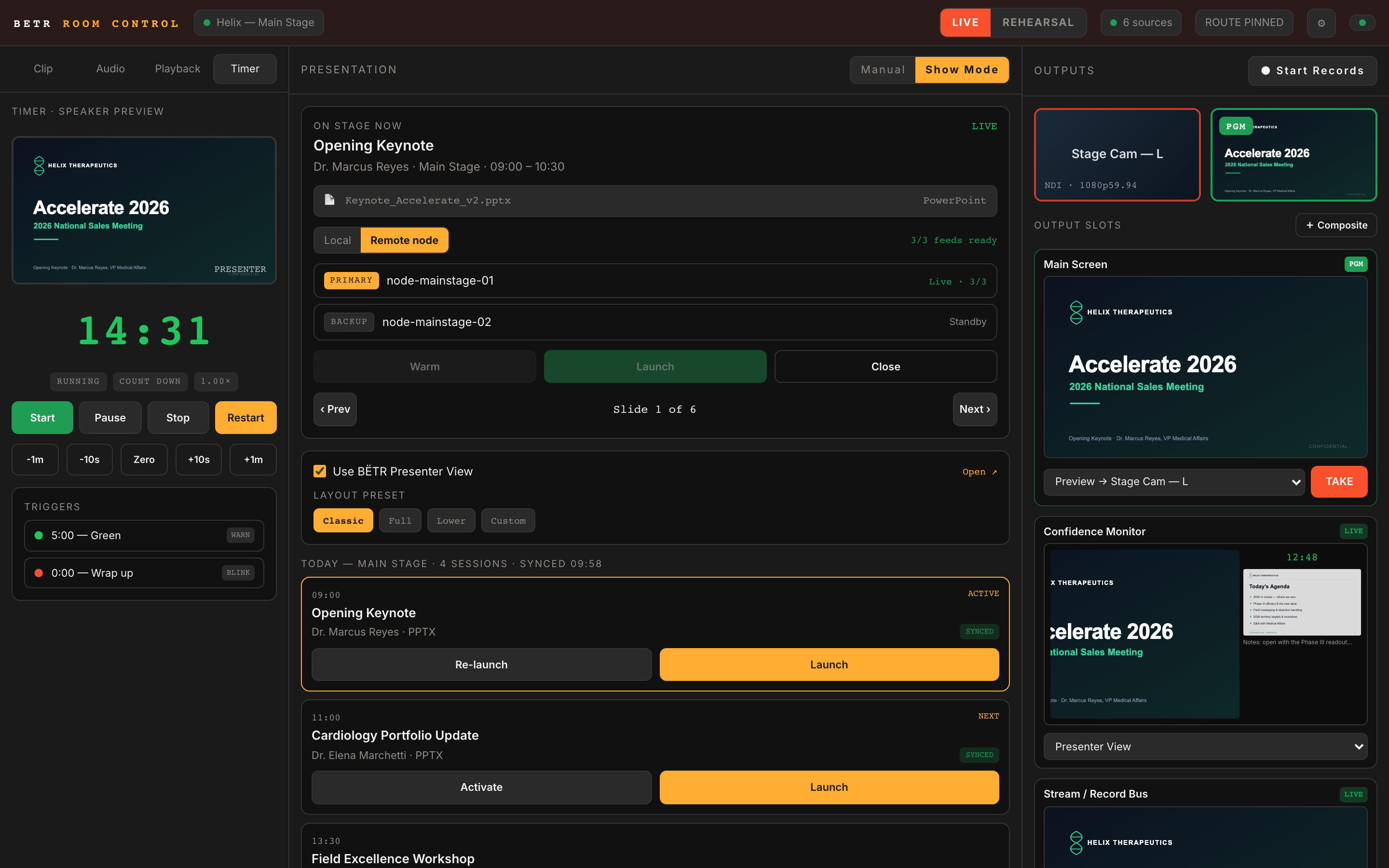
Cut between cameras, slides, and graphics — cleanly.
Line up your next shot, make sure it looks right, then put it live with one button. No black flash, no scramble — just a clean cut, every time.
- Preview it before it goes live — what you see is what they get
- Cameras, slides, lower-thirds, sponsor clips — anything you’ve got
- Run the whole show from a Stream Deck, every cue under a thumb
Presentation playback
Runs the decks so your speakers don’t have to.
PowerPoint, Keynote, and Google Slides — opened, loaded, and launched to full screen on cue. Next/previous, jump-to-slide, a presenter view with notes and a timer, and a confidence monitor the speaker can actually read. No more ‘can you advance my slide?’
- PowerPoint · Keynote · Google Slides
- Presenter view: notes, timer, next-slide preview
- A clean confidence monitor on stage
Presenter View
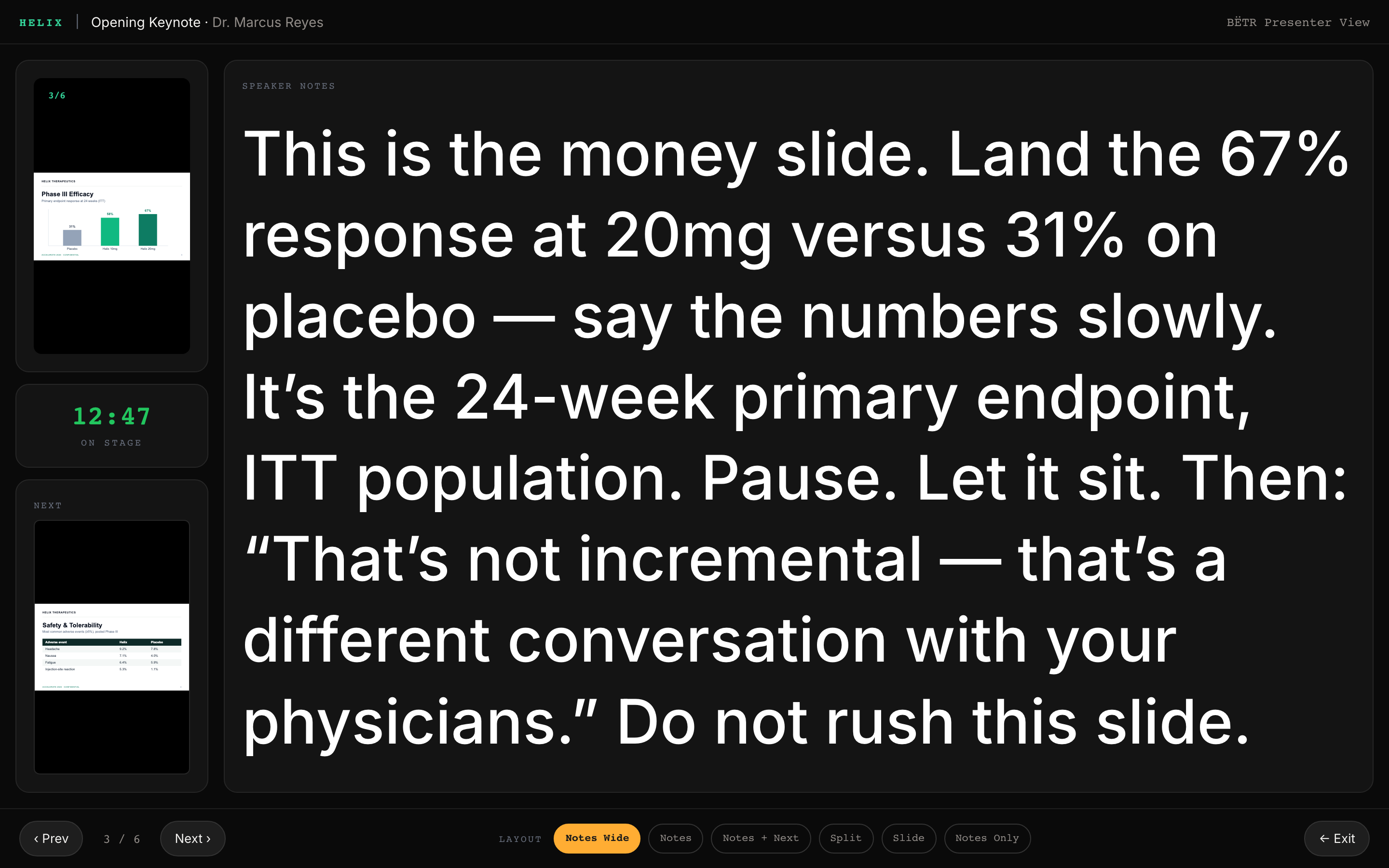
Notes your speaker can actually read — on every slide.
PowerPoint’s built-in presenter view fights you. It has to be set up from scratch for every talk, and it locks every slide’s notes to one font size — so the slide with a wall of text shrinks everything else down to a squint. We fixed it. Our Presenter View shows your speaker exactly what they need — the live slide, their notes, the next slide, and a clock counting down to their cue — and it scales the notes to fill the space on every slide. Big when there’s room, tighter when there isn’t. Always readable. Set it once and it runs all show.
- Set once — never reset for the next speaker
- Notes auto-scale to fit, so every slide stays readable
- Live slide, next slide, notes, and a countdown to your cue
- Lives on the podium monitor — the audience never sees it
Interstitials
When nothing’s on, something’s still on.
Between sessions the screen still looks like a show — your event’s branding, on a loop. Never a desktop. Never a stray Finder window. Never a frozen slide with someone’s notifications popping up. We call it an interstitial, and the audience never sees a dead screen.
Auto-recovery
Miss a cue? It catches it.
If an operator gets pulled away and a slide sits too long, Room Control quietly steps in — advancing or dropping to your interstitial instead of stranding the room on a stale screen. The kind of safety net you only notice when it saves you.
How the nodes work
Two Macs, one show.
Here’s the simple version. The operator’s Mac runs the room. The decks themselves run on a separate Mac — a node — so the thing driving your big screen stays rock-solid no matter how heavy the PowerPoint gets. And there are two of them.
The operator’s seat. Switching, routing, recording, timers.
Runs the live deck — slides, presenter view, all of it.
Already warmed and standing by.
If the primary ever hiccups mid-session, we promote the backup — and the audience never knows. That’s the difference between a vendor with one laptop and a team that plans for the bad night.
Local first
No Wi-Fi? No problem.
The venue network can fall over and your show won’t notice. Everything runs locally; the cloud catches up later.
Stream Deck
Every cue under a thumb.
Map takes, decks, timers, and recording to physical buttons so the operator’s eyes stay on the room.
Recordings
Captured as it happens.
Every session recorded in broadcast quality, auto-named, and back to your speakers fast. See how →
Want Room Control on your stage?
It comes with our crew — for your general session, your breakouts, or the one room that always goes sideways.